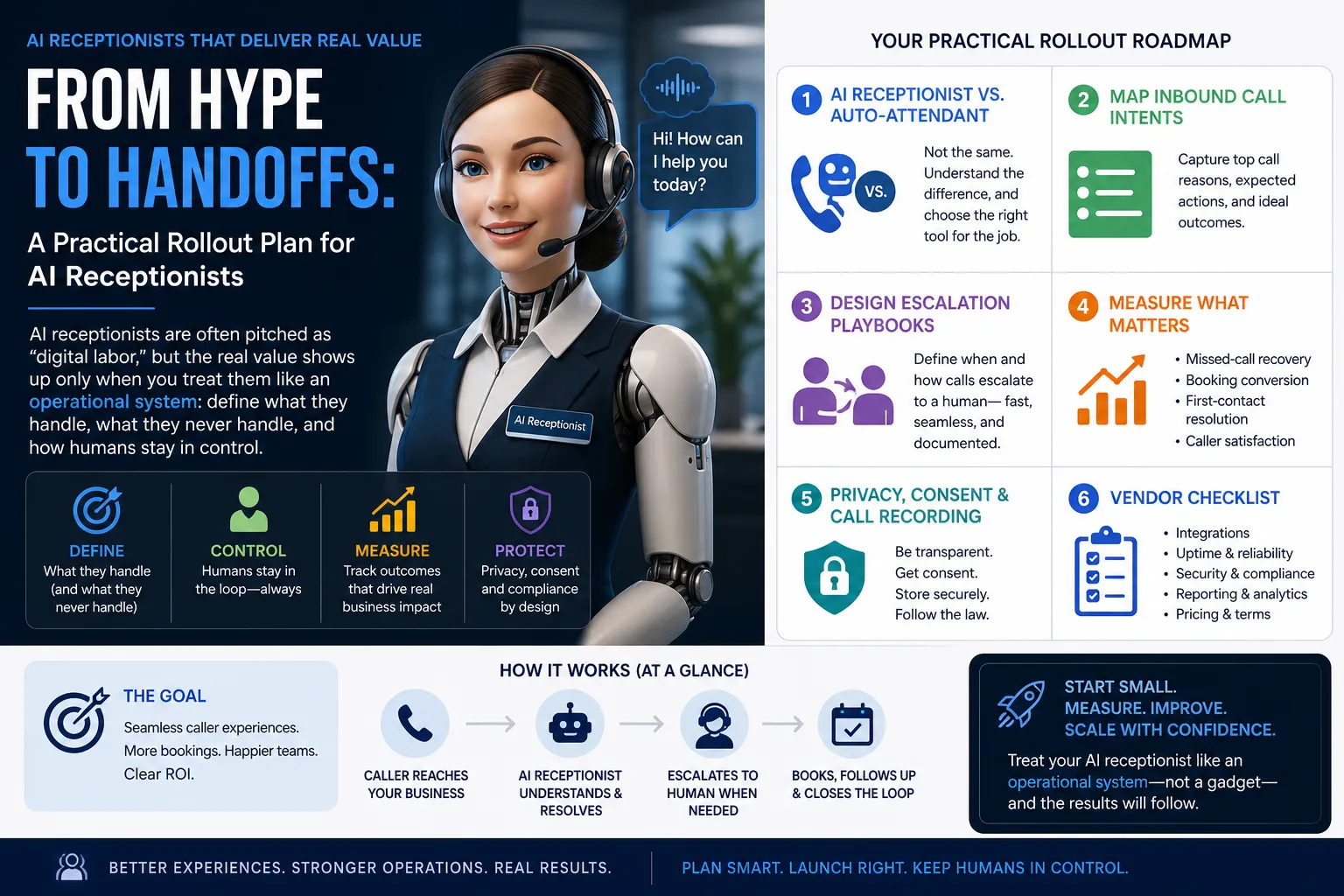
Reception and front-desk work is not “just answering phones.” It’s real-time triage, customer service, scheduling, sales support, and risk management—often all at once. That’s why the current wave of AI receptionist tools (sometimes positioned as “digital labor” with increasingly credible ROI claims) can be both promising and dangerous: promising because they can absorb repeatable call load; dangerous because the hype can tempt teams to automate the parts that require judgment, empathy, or discretion.
This post turns AI-receptionist hype into a practical rollout plan: define the system, map call intents, design handoffs, measure outcomes, and protect customer trust.
What reception/front-desk professionals do today (the real job)
The core of the profession is intake and coordination. On a typical day, receptionists and front-desk teams:
- Answer inbound calls and route them to the right person or department.
- Capture lead/customer details accurately under time pressure.
- Schedule, reschedule, and confirm appointments.
- Handle “quick questions” (hours, location, pricing ranges, availability) while keeping lines moving.
- De-escalate frustrated callers and protect staff time from non-urgent interruptions.
- Maintain a consistent, professional first impression for the business.
In practice, success is measured in fewer missed calls, fewer scheduling errors, faster responses, and better experiences—especially when the office is busy.
AI receptionist vs. auto-attendant: define the tools before you buy
Many teams already have an auto-attendant ("Press 1 for Sales, Press 2 for Support"). It’s rules-based call routing. It does not understand intent; it forces the caller to navigate a menu.
An AI receptionist is positioned as a conversational layer that can:
- Collect information in natural language (reason for calling, preferred times, contact info).
- Recognize common intents (book, reschedule, ask a question, talk to a person).
- Take actions (create a booking, send a confirmation, create a lead/ticket) when integrated.
- Escalate based on rules (urgency, sentiment, VIP status, compliance triggers).
Practical takeaway: treat auto-attendant as “routing,” and AI receptionist as “intake + routing + light task execution.” If a vendor can’t clearly explain what is automated vs. what is routed vs. what is handed to humans, assume you’ll inherit operational risk.
Repetitive admin tasks that are safe to automate first
Start with tasks that are frequent, low-risk, and easy to verify:
- Missed-call follow-up: when no one answers, automatically capture a callback number, reason for calling, and preferred time.
- Appointment confirmations: send SMS/email confirmations and reminders after booking.
- Basic FAQ handling: hours, address, parking, service area, “do you accept walk-ins,” and similar.
- Lead capture: name, phone, email, service requested, urgency, and how they heard about you.
- Call summaries: structured notes pushed into a CRM or ticketing tool for staff review.
These tasks reduce interruptions without pretending that the AI is a full replacement for a skilled receptionist.
Map your top inbound call intents (your automation blueprint)
You can’t design a reliable AI receptionist without an intent map. Build it from reality: listen to a sample of calls or review call logs, then create a shortlist of the most common reasons people call.
A practical “top intents” map for many small businesses and professional offices looks like this:
- Book a new appointment (new customer/patient/client).
- Reschedule/cancel an existing appointment.
- Check availability (next opening, specific provider/technician, preferred time window).
- Pricing or service questions (general ranges, what’s included, eligibility).
- Status updates (order status, request status, “when will someone arrive/call back”).
- Billing and payments (invoice questions, receipts).
- Urgent issue / escalation (safety concerns, severe dissatisfaction, time-sensitive problems).
- Speak to a person (operator request, complex situation).
Design tip: for each intent, define (1) what info must be captured, (2) what action the system can take, and (3) what conditions force escalation.
Design a handoff & escalation playbook (where the real ROI lives)
Most failures happen at the edges: a caller has a nuanced situation, the AI guesses wrong, and now trust is damaged. Prevent that with a written playbook that your whole team agrees to.
1) Handoff principles
- Fast exit to human: callers should be able to request a person at any time.
- No dead ends: if booking fails, create a task for staff with full context.
- Context transfers: when escalating, pass a structured summary (intent, urgency, captured details, attempted actions).
2) Escalation triggers (examples you can implement)
- High urgency: caller indicates an emergency or time-critical issue → immediate transfer to on-call or emergency instructions.
- Complexity: more than two clarifying loops without resolution → escalate.
- Sentiment: caller is angry/frustrated or requests a manager → escalate.
- Compliance/privacy: requests involving sensitive personal details → escalate to trained staff if your policy requires it.
- VIP/priority: existing high-value accounts or repeat customers → route to priority queue.
3) A concrete escalation script (for consistency)
Example wording you can adapt:
- “I can help schedule or take a message. If you’d like, I can also connect you to the team now.”
- “To make sure you get the right help, I’m going to bring in a specialist. Here’s what I’ve captured so far…”
Workflow bottlenecks software can improve (without replacing judgment)
Front desks often struggle with the same constraints:
- Peak-hour overload: the phone rings while staff are checking in visitors, handling payments, or assisting in-person customers.
- After-hours leakage: calls go to voicemail and never convert.
- Context switching: staff bounce between phone, calendar, CRM, and email—creating mistakes.
- Inconsistent intake: different staff collect different details, making follow-up harder.
AI can help responsibly when it standardizes intake, reduces missed-call loss, and keeps humans focused on exceptions and relationship-building.
Measure missed-call recovery and booking conversion (your ROI scoreboard)
If you can’t measure outcomes, you’ll end up debating “AI quality” instead of business impact. Track a small set of operational metrics before and after rollout:
- Missed-call rate: missed calls ÷ total inbound calls.
- Missed-call recovery rate: recovered conversations (callback completed or message captured with follow-up) ÷ missed calls.
- Booking conversion: completed bookings ÷ booking-intent calls.
- Lead capture completion: leads with required fields ÷ leads created.
- Time-to-first-response: how quickly a caller gets a useful next step (booked, routed, or follow-up committed).
- Escalation accuracy (internal QA): percent of escalations that staff agree were appropriate.
Practical example: if the AI can’t book because the calendar integration fails, it should still create a lead/task with a timestamp, caller number, intent, and preferred times. That still improves recovery—even when automation doesn’t complete the final step.
Where AI should NOT replace human judgment
Receptionists do more than transact—they interpret context and protect the business. Avoid full automation for:
- High-stakes or safety-related situations where incorrect guidance could cause harm.
- Complex complaints and emotional conversations where empathy and discretion matter.
- Policy exceptions (waiving fees, negotiating, special accommodations) that require authority.
- Ambiguous identity verification or any scenario where you’re unsure who the caller is.
In these cases, the AI’s job is to recognize the boundary quickly and hand off cleanly.
Privacy, consent, and call recording: design for trust
AI reception often involves transcription, summarization, call recording, and data syncing into other systems. That raises customer-trust and compliance concerns even before you talk about “AI.” Your rollout plan should include:
- Clear disclosure: tell callers they’re speaking with an automated system and whether calls may be recorded.
- Consent handling: provide a path to continue without recording (where feasible) or to speak with a person.
- Data minimization: collect only what you need for booking or follow-up; avoid sensitive details unless necessary.
- Retention rules: define how long recordings/transcripts are stored and who can access them.
- Access control: limit staff access to recordings and transcripts based on role.
Operational note: your policies and scripts should be consistent across phone, SMS, and email follow-ups so customers don’t feel “surprised” by how their data is used.
Vendor evaluation checklist (integrations, uptime, pricing)
To keep this practical, evaluate vendors like you would any mission-critical operations tool.
Integrations
- Calendar/scheduling: can it create, reschedule, and cancel appointments reliably?
- CRM/helpdesk: can it create leads/tickets with structured fields and call summaries?
- Telephony: does it work with your phone system, numbers, and call routing?
- Messaging: can it send confirmations/reminders via SMS/email with templates you control?
- Data export: can you export call logs, transcripts, and outcomes for reporting?
Uptime & reliability
- Uptime commitments: what happens if the service is down—does it fail over to voicemail or humans?
- Latency and call quality: does it respond quickly enough to feel natural?
- Error handling: when it can’t complete an action, does it create a task and escalate?
Pricing & total cost
- Pricing model clarity: per minute, per call, per seat, or per location?
- Overage and peak-hour costs: what happens during high volume?
- Add-ons: extra charges for recording, transcription, SMS, integrations, or analytics?
- Implementation cost: onboarding, call-flow design, and training time.
A practical rollout plan (small team friendly)
- Week 1: Baseline. Measure missed calls, booking conversion, and time-to-response. Document your top 8–10 call intents.
- Week 2: Pilot scope. Start with after-hours and missed-call recovery. Keep “talk to a person” prominent.
- Week 3: Booking integration. Enable scheduling only for the simplest appointment type(s). Add guardrails and escalation triggers.
- Week 4: QA + tuning. Review call summaries, misroutes, and escalations. Update scripts, FAQs, and required fields.
- Ongoing: Expand carefully. Add more intents only when you can measure success and handle exceptions.
Conclusion: augmentation beats replacement
AI reception can be “real ROI” when it’s treated as an operational capability—not a magic employee. The profession’s value is judgment, calm under pressure, and customer trust. The best rollout plans automate the repeatable work (intake, reminders, missed-call recovery) while strengthening human control through clear escalation rules, transparent disclosures, and measurable outcomes.
If your AI receptionist can reliably answer common questions, capture complete leads, book straightforward appointments, and hand off the messy edge cases with context, you’ll reduce missed opportunities without sacrificing the human experience that keeps customers coming back.
Source: CX Today — “AI Receptionists Are Becoming Digital Labor, and the ROI Is Getting Real”

1 comment
Join the discussion