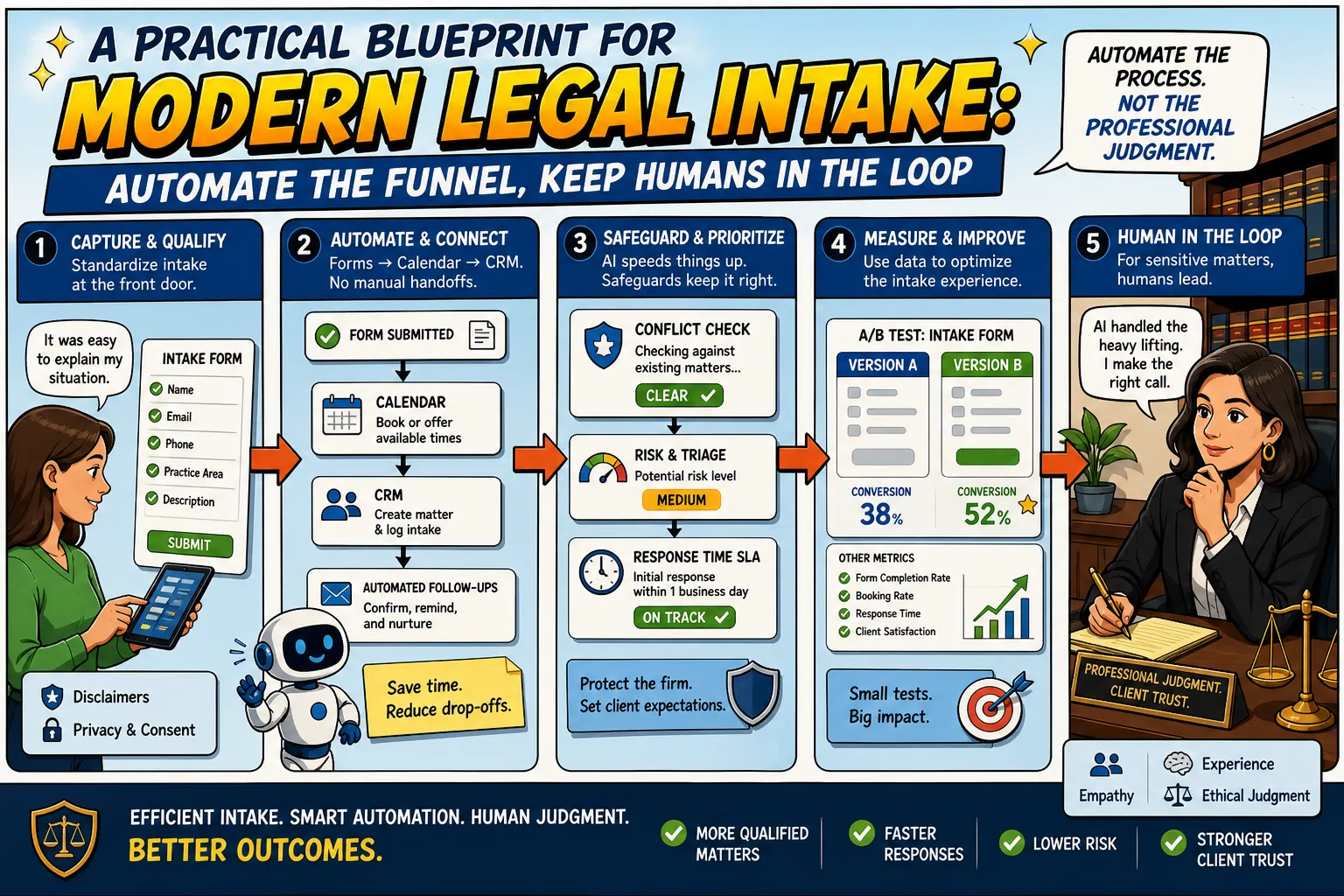
Legal intake isn’t just “answering the phone.” It’s the operational front door to a law practice: where prospective clients decide whether they trust you, where you decide whether you can help, and where you prevent avoidable risk (like conflicts or unrealistic expectations) before it becomes a problem. Automation and AI can absolutely improve intake—but only if you treat them as a blueprint for consistency, speed, and documentation, not as a substitute for legal judgment.
This post lays out a practical, day-to-day framework for modern legal intake: define funnel stages, standardize qualification, automate scheduling and follow-ups, build conflict checks and disclaimers into the workflow, set response-time SLAs, and measure what matters (show rate, signed retainer rate) using controlled A/B tests. The goal is augmentation: a smoother intake experience for clients and a more defensible, less chaotic process for your team.
What legal intake teams do today (and why it’s harder than it looks)
In many small firms and practice groups, intake is handled by a mix of reception, paralegals, intake specialists, and attorneys. The work spans:
- Capturing lead information from calls, web forms, referrals, chat, and email
- Pre-qualification (basic facts, urgency, jurisdiction, practice fit, budget expectations)
- Routing to the right person (practice area, geography, language, complexity)
- Scheduling consultations and ensuring the prospect shows up prepared
- Documenting communications so nothing is lost when staff changes or days get busy
- Reducing risk with conflict checks, disclaimers, and clear expectations
The intake “job” is ultimately about two outcomes: (1) helping the right people get to the right lawyer quickly, and (2) ensuring the firm doesn’t accept the wrong matters—or create accidental obligations—because the process was informal.
Repetitive admin tasks that can be automated immediately
Most intake friction comes from repetitive, error-prone coordination work. The following tasks are prime candidates for automation because they are rules-based and measurable:
- Form capture and normalization: standardize how you collect names, contact info, matter type, opposing parties, and urgency indicators.
- Auto-creation of records: create a lead/contact and matter record in your CRM as soon as a form is submitted.
- Scheduling logistics: let prospects book approved consultation slots without back-and-forth emails.
- Reminders and confirmations: send confirmation messages, calendar invites, and pre-meeting instructions automatically.
- Follow-up sequences: if a lead doesn’t book, doesn’t respond, or no-shows, trigger a consistent follow-up cadence.
- Internal notifications: alert the right staff member when a high-priority lead arrives or a consultation is booked.
None of these require “AI magic.” They require clear definitions, good forms, and reliable integrations.
Intake funnel stages: standardize the journey so you can improve it
Automation works best when you map intake like a funnel with explicit stages. A practical set of stages many firms can use:
- New lead: captured from any channel; acknowledgment sent.
- Pre-qualified: basic fit confirmed (practice area, jurisdiction, timing, budget expectations).
- Consult scheduled: appointment booked; reminders and prep sent.
- Consult completed: notes captured; next steps triggered.
- Decision pending: awaiting retainer, documents, or internal review.
- Signed / engaged: retainer signed and initial payment (if applicable) received.
- Not a fit / declined: closed with reason code for reporting.
When stages are explicit, your team stops relying on memory and starts relying on workflow. That makes response-time SLAs enforceable and makes metrics meaningful.
Form → calendar → CRM automation: the backbone of modern intake
The most practical “automation stack” for legal intake is a tight loop between three systems:
- Intake forms (structured data capture)
- Scheduling (controlled availability, correct routing)
- CRM (single source of truth for lead status, communications, and outcomes)
A day-to-day example workflow:
- A prospect submits a web form selecting “Employment” and “Wrongful termination.”
- The system creates a lead in the CRM, tags it “employment,” and assigns it to the appropriate intake queue.
- The prospect is offered a scheduling page with only the correct consultation type (duration, location/virtual) and only the attorneys or intake specialists who handle that category.
- Upon booking, the CRM updates the stage to “Consult scheduled,” sends the calendar invite, and triggers reminders plus a short questionnaire to gather missing details.
This is where automation delivers real operational value: fewer dropped leads, fewer scheduling errors, fewer manual data-entry mistakes, and cleaner handoffs.
Conflict checks and disclaimers: build guardrails into the workflow
Intake is also a risk surface. Automation can help you apply consistent guardrails at the right moment:
- Conflict-check prompts: require opposing party names (and common variants) before a consultation is confirmed, or before a matter is routed to an attorney.
- Disclaimers at submission and scheduling: set expectations that submitting a form does not create an attorney-client relationship and that time-sensitive matters require immediate action.
- Controlled routing: if a lead lists an opposing party that triggers a potential conflict, route to a human review step rather than auto-scheduling.
The point isn’t to over-automate risk decisions—it’s to ensure you consistently collect the information needed for a proper review and that you document what the prospect saw and agreed to during intake.
Response-time SLAs: automation that protects revenue and reputation
Speed matters in intake because prospects often contact multiple firms. A response-time SLA is a simple operational promise like: “Respond to new leads within X business hours.” Automation supports SLAs by:
- Instant acknowledgments: confirm receipt and set expectations for next steps.
- Escalation rules: if no staff member responds within the SLA window, notify a manager or backup queue.
- Time-of-day logic: after-hours leads receive a different message and a self-scheduling option for the next available slots.
SLAs also reduce internal stress. Instead of heroic catch-up, you get predictable throughput.
Metrics that matter: show rate, signed retainer rate, and why A/B tests belong in intake
If you can’t measure intake, you can’t improve it. Two practical metrics to track at minimum:
- Show rate: the percentage of scheduled consultations that actually occur.
- Signed retainer rate: the percentage of completed consults (or qualified leads) that convert into signed engagements.
Once your funnel stages are consistent, you can run simple A/B tests that improve outcomes without changing legal work product. Examples:
- Reminder cadence: one reminder vs. two reminders; SMS + email vs. email only.
- Form length: shorter initial form with a follow-up questionnaire vs. longer form upfront.
- Scheduling options: offering fewer, more curated time slots vs. broad availability.
- Intake messaging: different subject lines or clearer “what to prepare” instructions to reduce no-shows.
Keep tests narrow and ethical: you’re optimizing clarity and responsiveness, not manipulating vulnerable clients.
Where AI can assist responsibly in legal intake
AI can help most when it supports staff—reducing cognitive load and improving consistency—without making final decisions about legal merit or strategy. Responsible use cases include:
- Drafting and summarization for internal notes: convert call transcripts or rough notes into a structured intake summary for review.
- Classification and routing suggestions: propose a practice area tag or urgency flag for a human to confirm.
- Quality checks: detect missing fields (e.g., no opposing party listed) and prompt the prospect or staff to complete them.
- Suggested follow-up templates: recommend the right email/SMS template based on stage (scheduled, no-show, decision pending).
The key pattern is AI proposes, humans approve—especially when the outcome could affect conflicts, expectations, or client trust.
Where AI should not replace human judgment
Some intake decisions are too sensitive, too contextual, or too risky to delegate:
- Conflict determinations: AI can help collect and normalize names, but a qualified process should make the call.
- Assessing legal merit or value: deciding whether a case is “good” or what it’s “worth” is not an intake automation task.
- Giving legal advice: intake messaging must avoid drifting into advisory territory.
- Handling crisis or vulnerable situations: threats, safety risks, or highly emotional matters should route to trained humans immediately.
In practice, a modern intake system should include a “human-in-the-loop” branch for sensitive cases: it’s not a failure of automation—it’s a safety feature.
Risks, ethics, privacy, and trust: what can go wrong
Automation changes how information moves. That creates predictable risk areas you should address up front:
- Privacy and confidentiality: intake data is sensitive. Limit access, minimize data collection to what’s needed, and ensure secure handling across tools.
- Over-collection: long forms can capture unnecessary details; collect progressively (basic first, deeper later) to reduce exposure.
- Misrouting: incorrect tags or calendar links can send a lead to the wrong person, causing delays and a poor experience.
- False expectations: automated messages must be clear about timelines and what happens next.
- Model errors (if using AI): summaries can omit nuance; classifications can be wrong. Always review before relying on outputs.
Trust is earned in intake. A fast response that feels careless can be worse than a slightly slower response that feels attentive and accurate.
Practical automation ideas a small firm can implement this quarter
You don’t need an enterprise transformation. Start with a few high-impact changes:
- Define your funnel stages and require every lead to have a stage and an owner.
- Build one “gold standard” intake form per practice area with required fields for conflict screening and routing.
- Connect form submissions to CRM creation so no lead stays in an inbox.
- Implement self-scheduling with controlled consultation types and buffers.
- Automate reminders and add a pre-consult checklist to improve show rate.
- Set a response-time SLA and create escalation notifications for missed windows.
- Track show rate and signed retainer rate by source and by intake specialist to spot bottlenecks.
- Run one A/B test per month (e.g., reminder timing) and keep what measurably improves outcomes.
If you add AI, start with internal-facing assistance (summaries, missing-field detection, template suggestions) and keep approval steps explicit.
Conclusion: modern intake is augmentation, not replacement
Automation and AI can reshape legal intake in a grounded, practical way: faster responses, fewer dropped leads, cleaner data, and a more consistent client experience. But the best systems don’t try to remove humans from the process. They standardize what can be standardized—qualification, scheduling, follow-ups, documentation—and they elevate human attention to the moments that require judgment, empathy, and professional responsibility.
A modern intake operation is a competitive advantage. Done well, it improves client trust and reduces operational risk at the same time.
Source: https://www.lawmatics.com/blog/legal-intake-how-do-you-automate-the-intake-process

Comments
No comments yet — be the first to share your thoughts.
Join the discussion