Building a Practical Disaster Recovery Runbook for a Laravel Application
A step-by-step guide to the Laravel app server disaster recovery workspace we built
Operations
Building a Practical Disaster Recovery Runbook for a Laravel App
Disaster recovery plans often fail because they are too abstract when the incident is real. A useful runbook should show the order of work, the systems involved, and the decisions responders need to make under pressure.
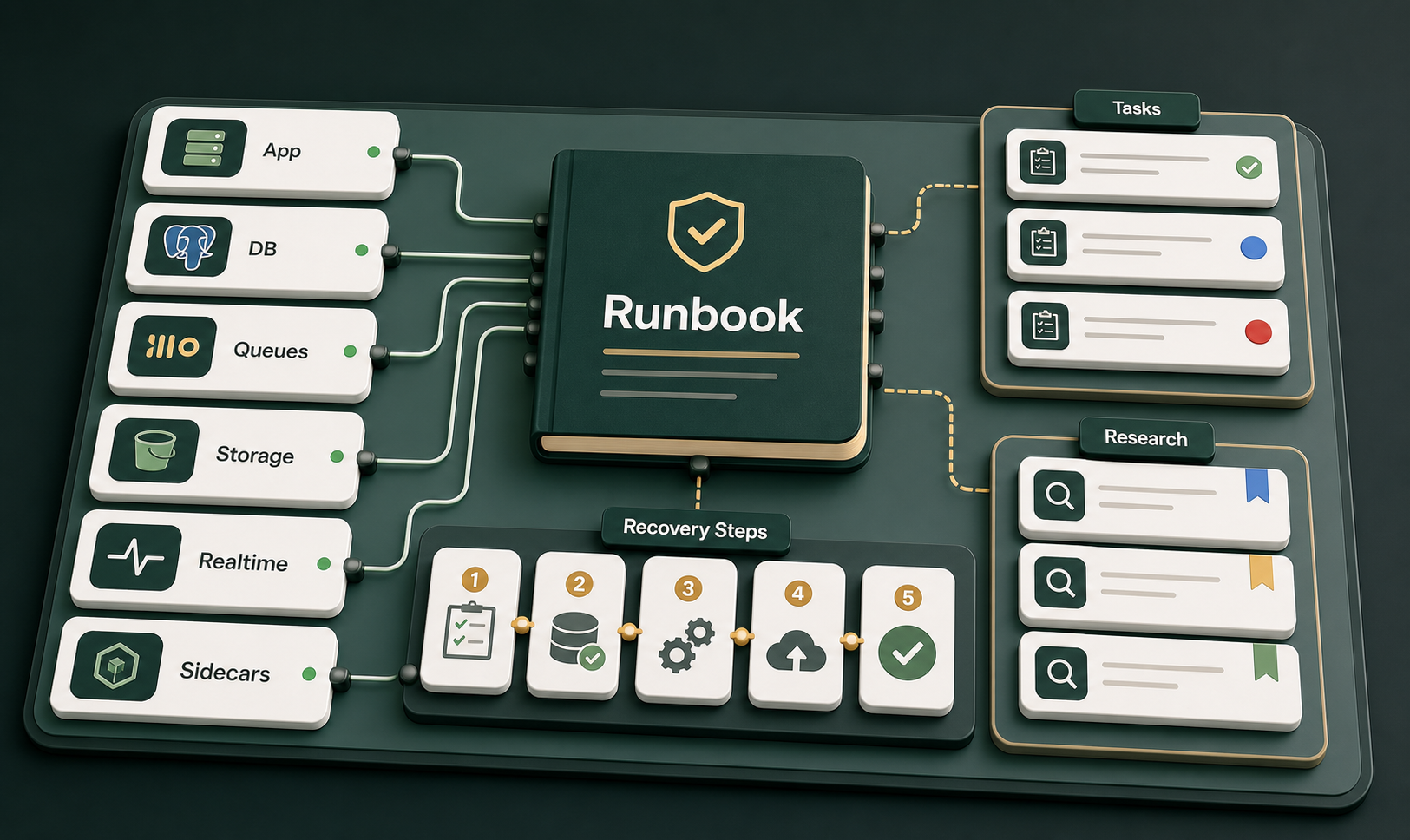
Connected to the app server, recovery steps, dependencies, and tasks.
A disaster recovery plan is only useful if someone can follow it while the system is failing. It cannot depend on perfect context, calm conditions, or one engineer remembering every hidden dependency. It needs to start with uncertainty and guide the team toward facts.
That is the idea behind this Laravel disaster recovery workspace. Instead of treating the runbook as a long static document, the application architecture, recovery process, dependencies, tasks, and improvement notes are represented as connected operational cards. The result is a guidebook that maps the system to the response.
What the DR Workspace Contains
At the center of the workspace is the App server failure runbook. It is attached directly to the Laravel app server, then connected to the systems the application depends on during recovery.
Laravel app server, PostgreSQL primary database, S3 media bucket, and Reverb websocket service.
SQS default lane, SQS AI-heavy lane, worker health, queue depth, and delayed processing risks.
Crawl4AI, MarkItDown, and SearXNG, which can affect ingestion, conversion, search, and research workflows.
This matters because an application outage is rarely isolated to one machine. A Laravel app may look down because the app server is unhealthy, but the actual failure could be database connectivity, queue backlog, bad environment configuration, broken storage permissions, websocket failures, a bad deploy, or an upstream routing problem.
Why It Starts From Initial State
The runbook begins from an initial state, not from a diagnosis. That distinction is important. In a real incident, the first responder may not know whether the problem is host failure, application runtime failure, a dependency outage, a failed deployment, configuration drift, or external traffic routing.
Starting from initial state forces the team to establish facts before taking action. The first moves are intentionally procedural: declare the incident, confirm user impact, freeze deployments, verify edge-to-origin routing, connect to the server, and preserve evidence.
That order prevents a common outage failure: changing the system before the team understands the blast radius, current state, and safest recovery path.
The 15-Step Recovery Sequence
The main runbook is organized as a sequence of top-level recovery steps. Each step flows into the next, giving responders a path from first signal to final closure.
- Declare incident and start recovery log. Open the incident record, assign roles, establish the recovery channel, and state the recovery objective.
- Confirm user impact and health checks. Determine whether users are affected, validate health checks, and identify visible symptoms.
- Freeze deployments and configuration changes. Stop nonessential changes so the system does not keep shifting during diagnosis.
- Verify edge-to-origin path. Check whether traffic is reaching the application correctly from the edge through the origin.
- Connect to app server and preserve evidence. Capture current state without destroying useful diagnostic data.
- Check host or container health. Review infrastructure health, resource pressure, process status, and container state.
- Check application runtime services. Validate the Laravel runtime and services required for the app to respond.
- Review logs, deploys, and configuration. Look for recent changes, bad releases, broken environment variables, or configuration drift.
- Validate required dependencies. Confirm the app can reach PostgreSQL, SQS, Reverb, S3, and required sidecars.
- Recover the safest failing layer first. Apply the least destructive recovery action based on the confirmed failing layer.
- Restore data or configuration from backup if required. Use backups only after verifying the target and recovery impact.
- Run application smoke tests. Confirm the app can boot, serve traffic, process key workflows, and interact with dependencies.
- Re-enable traffic gradually and monitor. Watch error rates, latency, queue depth, and user-facing behavior.
- Communicate status and decisions. Keep stakeholders informed about impact, progress, risks, decisions, and next updates.
- Close incident and update runbook. End the incident only after validation, then capture lessons learned.
Tasks Make Each Step Executable
Each recovery step has its own task cards. That is where the runbook becomes practical. A step like "validate dependencies" is too vague during an outage. A task card can tell the responder what to check, what result they need, where to record the finding, and when it is safe to move forward.
For example, the first step breaks down into concrete actions: open the incident record, assign roles, open the recovery bridge or channel, and state the recovery objective. Other steps hold tasks for health checks, dependency validation, evidence preservation, smoke tests, traffic restoration, and incident closure.
This structure also makes parallel work safer. One person can validate the database while another checks the queue lane, but both are still working inside the same recovery model.
Research Tasks Keep the Runbook Alive
A runbook should not be treated as finished forever. Every recovery step contains assumptions: which logs matter, which commands are safe, which dashboards are authoritative, which dependencies are critical, and which checks prove the service is healthy again.
The workspace includes research tasks for the top-level steps, giving the team a place to improve the runbook after real incidents, drills, and infrastructure changes. If something was unclear, risky, missing, or worth automating, it has a place to go.
Dependency Mapping Prevents Blind Spots
The runbook is connected to the systems it depends on: PostgreSQL, SQS default and AI-heavy queues, Reverb, S3, Crawl4AI, MarkItDown, and SearXNG. That dependency map keeps recovery grounded in the actual application architecture.
It also changes how the team thinks during an incident. Instead of asking only, "Is the server up?" responders can ask, "Which part of the application path is failing?" The app server might be healthy while users still experience failures because queue workers are stuck, storage permissions changed, websockets are unavailable, or a sidecar is failing.
What to Improve Next
The next step is to make each task even more executable. The team can add exact commands, dashboard links, log locations, health check URLs, rollback procedures, queue inspection commands, database connectivity checks, S3 validation steps, smoke test scripts, communication templates, recovery objectives, and task ownership.
Once those details are in place, the runbook becomes more than an incident response guide. It becomes an operational training tool and a living model of how the system is supposed to recover.
A good disaster recovery runbook is not just a document. It is a model of how the system fails, how the team responds, and how service is safely restored. For a Laravel application, that means connecting the app server, dependencies, recovery steps, tasks, and improvement work into one operational view.







Comments
No comments yet — be the first to share your thoughts.
Join the discussion